LS DevTool (F12) — Android Mobile Web Inspector & Chrome DevTools Browser APK
Technologies & Frameworks
LS DevTool (F12) — Android Mobile Web Inspector & Chrome DevTools Browser APK is a production-ready, security-verified full-stack script built using Android, Kotlin, Chrome DevTools. The complete package includes unencrypted source files, full MySQL/PostgreSQL database schemas, and step-by-step documentation with an Extended Commercial License allowing deployment across unlimited domains with 0% recurring transaction fees.
Description & Key Features
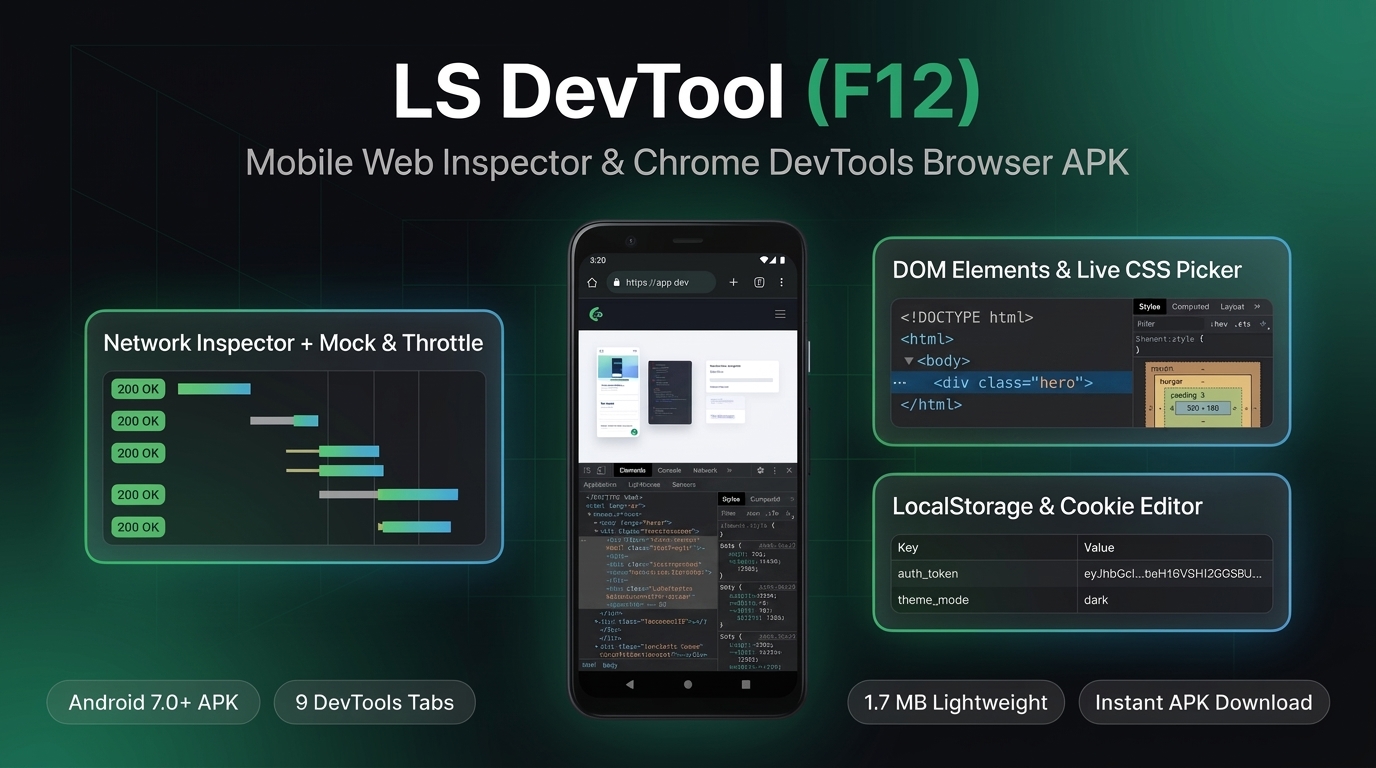
## Full Desktop Chrome F12 DevTools—Right Inside Your Android Phone (Compiled Release APK) Tired of needing a laptop and USB cable just to inspect DOM elements, monitor XHR/Fetch API calls, edit cookies, or test mobile responsiveness? **LS DevTool (F12)** is a native, ultra-lightweight (**1.7 MB**) Android web browser with an embedded **9-tab Chrome-grade Developer Tools engine**. Built for mobile web developers, QA testers, security analysts, and coding students, this release delivers the compiled **`app-release.apk`** ready for immediate one-tap installation on Android 7.0+ devices. > **Important Note on Delivery Format**: This product provides the compiled, ready-to-install Android **Release APK (`app-release.apk`)** for direct mobile usage (no computer or Android Studio compilation required). --- ## 9 Full-Featured DevTools Panels Built-In Tap the floating **F12** badge or toolbar code toggle on any website to open the resizable DevTools drawer (with Dark & Light themes): ### 1. Elements Inspector & Live Visual Editor * **Interactive DOM Tree**: Expand, inspect, copy, or delete DOM nodes in real time. * **Touch Element Picker**: Tap any button, card, or image on a webpage to jump straight to its HTML node and computed CSS styles. * **Live CSS & DesignMode**: Test style tweaks, toggle `designMode` to edit live page text, and turn on **Layout Outlines** to debug CSS grids and alignment visually. ### 2. Network Inspector (With Request Blocking & Mock Overrides) * **Live Traffic Waterfall**: Inspect every XHR, Fetch, Document, Script, CSS, and Image request with status codes (`2xx`, `3xx`, `4xx/5xx`), payload headers, and response previews. * **Network Request Blocking**: Block specific URL patterns on the fly to test error handling or ad/tracker behavior. * **Mock API Overrides**: Intercept matching API endpoints and return custom HTTP status codes and JSON response bodies directly on your phone. * **Network Throttling**: Emulate `Fast 3G`, `Slow 3G`, or `Offline` conditions. ### 3. Interactive JavaScript Console & REPL * Execute live JavaScript expressions on any loaded webpage with **REPL command history** and **Live Expressions** pinned at the top. * Filter logs cleanly across `Errors`, `Warnings`, `Info`, and `Verbose`, with instant object/table inspection and export logs to file. ### 4. Sources Viewer, Code Snippets & Persistent User Scripts * View formatted page source, create reusable JavaScript **Snippets**, and save custom **User Scripts** persistently inside the native SQLite database (`BrowserDbHelper`) to auto-inject into sites. ### 5. Application Storage & Native Android Cookie Editor * View, search, add, edit, and clear **`localStorage`** and **`sessionStorage`** keys. * Direct bridge to Android's native **`CookieManager`** to inspect and modify live session cookies or clear all site data in 1 tap. ### 6. Performance, Memory, Lighthouse & Sensors * **Performance**: Track runtime samples, **CLS (Cumulative Layout Shift)** scores, and Long Tasks. * **Memory**: Monitor JavaScript heap usage metrics. * **Lighthouse**: Run instant on-device page audit checks for performance, accessibility, and SEO tags. * **Sensors**: Override **Geolocation (GPS coordinates)** and test **Vision Deficiency Filters** (color-blindness accessibility simulation). --- ## Native Android Browser Capabilities * **Desktop / Mobile Switcher**: Toggle instantly between Mobile WebView and Linux Chrome 128 Desktop User-Agent. * **SQLite Bookmarks & Browsing History**: Fast offline persistence for bookmarked dev environments and recent URLs. * **Find in Page**: Highlight and cycle through text matches directly inside rendered pages. * **Export to Device Storage**: Save network HAR/logs, console outputs, and page sources directly to your phone's storage. --- ## Technical Requirements & Package Info * **File Delivered**: Signed Release APK (`app-release.apk`) * **App Size**: 1.7 MB (R8 / ProGuard optimized & shrunk) * **Minimum Android Version**: Android 7.0 Nougat (API 24) and above (Target SDK 36) * **Application ID**: `com.lushai.f12` * **Version**: 1.0.0
Highlighted Capabilities & Features
Chrome-Style 9-Tab F12 DevTools
9 PanelsIncludes Elements, Console, Sources, Network, Performance, Memory, Application, Lighthouse, and Sensors tabs inside a mobile bottom drawer.
Network Intercept, Blocking & 3G Sim
Mock & ThrottleInspect live Fetch/XHR requests, block URL patterns, inject custom mock JSON API responses, and simulate Fast 3G, Slow 3G, or Offline states.
Touch Element Picker & DesignMode
Live DOM EditTap any element on a webpage to inspect CSS rules, toggle layout outlines, and edit live text directly on your Android screen.
JS Console, Snippets & User Scripts
SQLite VaultRun JavaScript via interactive REPL with history, pin live expressions, and store custom auto-inject User Scripts inside SQLite.
LocalStorage & Native Cookie Manager
Native BridgeDirectly read, edit, and wipe LocalStorage, SessionStorage, and Android native CookieManager entries with 1-tap cache clearing.
Lighthouse Audits & GPS Sensor Mock
Lighthouse + GPSRun mobile accessibility/SEO checks, emulate custom GPS coordinates, and test color-vision deficiency filters on any site.
Ultra-Lightweight R8 Release APK
1.7 MB APKShrunk with ProGuard/R8 to just 1.7 MB for instant installation on Android 7.0+ phones with Desktop User-Agent toggle and Find in Page.
Software Specifications
- Delivery Format
- Compiled Android Release APK (app-release.apk)
- Minimum Android OS
- Android 7.0 Nougat (API 24) – Android 16 (Target SDK 36)
- Package ID
- com.lushai.f12
- DevTools Panels
- 9 Tabs (Elements, Console, Sources, Network, Performance, Memory, Application, Lighthouse, Sensors)
- Themes Supported
- Dark & Light DevTools Drawer Modes
- Storage Engine
- Native SQLite (Bookmarks, History, User Scripts, Settings)
- App Version
- v1.0.0
- APK File Size
- 1.7 MB (R8 Optimized)
How to Build & Run This Mobile App (4-Step Quickstart)
~10 Mins SetupInstant Download Archive
Download the unencrypted ZIP containing the full Android Studio project, Kotlin/Compose code, assets, and documentation.
Open in Android Studio
Extract the ZIP and open the folder in Android Studio (Ladybug, Koala, or later). Gradle will automatically configure project dependencies.
Configure SDK & Keys
Add your Android SDK path or API keys in local.properties. The project includes step-by-step setup instructions for fast configuration.
Build & Run App
Select 'Run App' to launch in an emulator or connect your Android device. Generate signed APK/AAB bundle for deployment.
Why Developers Choose CodeSeller vs Other Marketplaces
| Feature & Freedom | CodeSeller.in | Traditional Marketplaces |
|---|---|---|
| Domain Licensing | Unlimited Domains (No Lock) | Single Domain Lock ($$$ for Extended) |
| Source Code Transparency | 100% Unencrypted & Clean | IonCube / Obfuscated Code Common |
| Platform Transaction Fees | 0% Commission Direct Ownership | 2% to 35% Fees + Gateway Charges |
| Full SQL Database Dump | Included in Instant Download | Often Missing or Extra Charge |
| Payment Convenience | Instant UPI, Cards & NetBanking | International Cards Only + FX Fees |
| Direct Developer Contact | Direct WhatsApp & Author Tickets | Slow 48-Hour Forum Support |
Frequently Asked Questions (FAQ)
Key questions and deployment guidelines provided by author @ceeprolific
Ratings & Verified Buyer Reviews
Verified feedback from customers who purchased this source code
0 Verified Customer Ratings
100% Recommended by DevelopersNo reviews written yet
Be the first verified customer to rate and review this source code!
Includes full source code & unlimited domain rights

Created By Author

Full Stack Software Engineer & Verified Marketplace Elite Developer.
Customers who viewed this also bought
Similar verified Mobile Apps (Android, Kotlin & Flutter) source code packages